Team
2 Designers, 1 PM, 1 Engineer
Role
Product Designer
Timeline
March 2025 - October 2025

HUNGRY CAFE
Project
A Mobile-First Pickup Experience for Local Cafes
esigned an end-to-end cafe commerce experience for Hungry Cafe that connected local discovery, bulk pricing, ordering, and QR-verified pickup while ensuring a seamless journey for customers and cafe staff.
D
From discovering a café to picking up an order.
Hungry Cafe is a mobile-first commerce platform that helps customers discover nearby cafés, browse menus, and place pickup orders using quantity-based Bulk Buy savings or prepaid BulkPass redemptions.
Unlike traditional ordering experiences, the journey doesn't end at checkout. Every customer action connects to a café-side fulfillment workflow, from order acceptance and preparation to QR-verified pickup.


My contribution
As a Product Designer, I designed the end-to-end customer experience across location discovery, menu exploration, purchasing, checkout, order tracking, and pickup. I also worked on café-side fulfillment workflows, defining shared order states, recovery patterns, and reusable components to keep both experiences consistent.
The system
One order, two sides
A pickup order doesn't end at checkout. It ends at a counter.
The customer app and café dashboard are two sides of the same order. I designed both around a shared lifecycle, defining how each transition — from acceptance and preparation to pickup verification — should appear on each side. An order marked “Ready” by café staff needed to mean exactly the same thing to the customer waiting to collect it.
Design exploration
The PRDs defined the capabilities. The experience still needed to be designed.
I translated two PRDs into connected customer and café journeys, identifying decisions the requirements left unresolved. Established commerce patterns provided useful reference points, but location recovery, quantity-based savings, prepaid passes and verified pickup required solutions tailored to BulkMagic's business rules.
Location-based discovery, searchable café listings and familiar store cards that make nearby options easy to compare.
Added manual ZIP entry and recovery from denied permissions, while keeping store selection explicit throughout the ordering journey.
Familiar menu customization, cart review, order progress and pickup interactions.
Designed customer and café experiences around shared order states, connecting checkout, preparation and QR-verified handoff.
Savings-led discovery, visible value and clear pickup expectations before purchase.
Distinguished quantity-based Bulk Buy savings from prepaid BulkPass redemptions, making eligibility and restrictions visible before commitment.
Discovery needed a fallback
Location makes nearby results faster, but a denied permission cannot become a dead end. The experience needed a manual path that still resolves to a location and returns the same ranked cafés.
Savings had to appear before checkout
Bulk pricing changes how many items someone adds. A rule that only surfaces as a discount line at payment arrives after the decision it was meant to inform.
Order status connects both sides
Customer tracking and café fulfillment are one lifecycle. Without shared states, “ready” means two different things on two screens in the same shop.
Three value models were being treated as one
Bulk Buy, BulkPass and Wallet appeared in the requirements without a customer mental model. Left undefined, they would have become three badges that all look like discounts.
Principles I designed against
Location accelerates discovery. It never gates it.
A denied permission shouldn't prevent a customer from finding nearby cafés.
Show the saving before the commitment.
Pricing rules should inform purchasing decisions, not surprise customers at payment.
One order lifecycle, both sides of the counter.
Customer and café interfaces should reflect consistent order states.
Different value models need different mental models.
Bulk Buy, BulkPass and Wallet must remain conceptually distinct.
Challenge 01
Tap path · Enter manually · type a ZIP · Continue
What the clip shows
- 01Declining location isn't a dead endThe permission screen offers a manual path with the same weight as Allow.
- 02ZIP, address or landmarkWhatever the customer types resolves to a single point on the map.
- 03Same nearby ranking after resolutionCafés are ranked from that point, and the location is confirmed inline above the results.
Whether customers share their location or enter it manually, both paths lead to the same discovery experience. The input resolves to geographic coordinates, so nearby cafés are ranked by actual distance rather than ZIP code boundaries. A map-and-list layout keeps location context visible while making distance, preparation time and ratings easy to compare.
A ZIP is an input, never the filter.
Stores are ranked by latitude and longitude, not postal code. A café two blocks away can sit in the next ZIP, so a typed ZIP resolves to a point and cafés are ranked by true distance from it. Filtering by ZIP would have hidden the closest options at exactly the moment the customer had already said no to location.
Challenge 02
Bulk Buy isn't just a discount applied at checkout. It's a pricing rule that influences how customers build their orders.
Tap path · Breakfast Burrito · + · Add 7 · Checkout · Pay · Track
State the rule before quantity changes
The café states it once — any 7+ items take $5 off the bag — and every eligible item carries the same “Bulk eligible” badge, so no single item looks like it has its own discount.
Confirm it as a state change
When the bag qualifies, the stepper turns mint and the cart says so. Qualification is announced, not silently applied.
Keep it visible through payment
The saving follows the order into checkout and the pay button, so the reason for the price never disappears at the moment of commitment.
The QR comes once the order is ready
Payment confirms the purchase, but pickup begins only when the café marks the order ready. The QR code becomes available at that moment, so customers don't arrive with a pickup code before their order is prepared. The same transition appears on the café dashboard.
Bundles such as the Office Coffee Pack carry their own neutral “Bundle” badge. A pre-priced combo is a different promise from a quantity rule, and it should never be mistaken for one.
Cross-cutting decision
The most difficult interactions weren't always on the happy path. They happened when customers had already invested time building an order and something changed underneath it.
I designed recovery patterns that explained what changed, preserved progress where possible, and made the next action clear without forcing customers to restart.

Switching cafés
A cart holds one café. Rather than clearing it silently, the sheet names the current café, shows exactly what will be lost, and waits for a deliberate confirmation.

Losing an item mid-checkout
One removal can also break Bulk Buy eligibility. The interface recalculates in place, explains the change to the saving, and offers replacements instead of restarting checkout.
Edge cases from the MVP requirements
| Edge case | Severity | What changes underneath | Interface behavior |
|---|---|---|---|
| Buyer adds items from a second café | High | Single-cart rule invalidates the existing bag | Name the current café, show what's lost, require explicit confirmation |
| Item goes out of stock after it's in the cart | Critical | Line item, Bulk Buy eligibility and total | Recalculate in place, explain the change to savings, surface replacements |
| Card fails after the order is placedRule defined | Critical | Order exists; payment does not | Retry inside the order, with a stated timeout before cancellation |
| Seller forgets to mark the order readyRule defined | High | Customer-facing status stalls mid-preparation | Reminder to the café, and a status that ages visibly rather than sitting still |
| Buyer delays or doesn't show for pickupRule defined | Medium | Prepared order with no handoff | Auto-expiry on a stated window, with the refund rule shown before it applies |
The illustrated scenarios show the interaction patterns developed in detail. Rows marked “Rule defined” were documented as intended behaviors from the MVP requirements and would require further validation during implementation.
Challenge 03 · Connected fulfillment
One order, two interfaces, one point of truth
Customer
Café

QR verification was already defined in the requirements. My design decision was to build the experience around a shared order lifecycle, defining how each state should appear to customers and café staff. When staff confirm pickup, the order moves to Fulfilled on both sides, closing the loop between digital checkout and physical handoff.
Challenge 03 · The café side
The PRD introduced Ramesh Patel, a café-owner persona managing two locations and eight staff members. His priorities were straightforward: shorter queues, simpler order management, and a dashboard that required minimal learning.
Using this project-defined persona as a reference, I designed a task-focused seller experience with clear order statuses, one primary action per stage, and consistent terminology across the customer and café interfaces.
Tap path · Accept order · Mark ready for pickup · Confirm handover
- Tap 01Accept order
The customer's order moves to Preparing.
- Tap 02Mark ready for pickup
The customer's phone shows Ready and the QR.
- Tap 03Confirm handover
The scan resolves both sides of the order at once.
- ResultFulfilled
Prep time logged against the 7-minute target.

A customer's saving shouldn't read as the café's loss.
On the seller's order detail, the Bulk Buy line is labeled as funded by the platform, not deducted from the café's payout. The same discount that motivates a customer would otherwise look like lost revenue to the owner approving the order.
Challenge 04
Each one answers a different question, so each one needed a different model.
Quantity-based savings that apply when an order reaches an eligible threshold. The benefit belongs to the current purchase.
A prepaid package that customers can redeem for eligible items across participating cafés, subject to usage limits.
A balance-based payment model, distinct from discounts and prepaid redemptions. Defined conceptually but excluded from the v1 interface scope.
BulkPass introduced a different interaction challenge: customers needed to understand what they had purchased, where they could redeem it, and how much remained available. Rather than introducing a separate redemption journey, I integrated BulkPass into the existing checkout and made eligibility, remaining uses and daily limits visible before an action was blocked.
Tap path · Coffee Pass · Buy · View my passes
Discover, buy, trackEntered from Discover, not a fourth tab. The pass is a defined set of drinks, priced up front, and My BulkPasses shows what's left and today's limit.
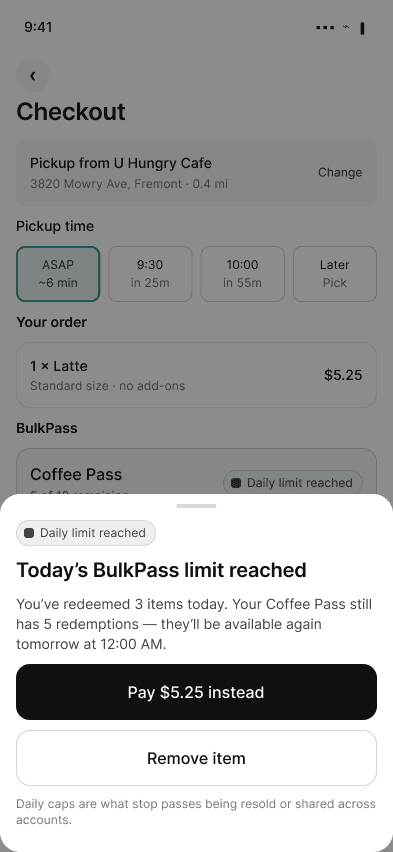
Redeem, within limitsRedeemed in the same checkout, nothing forks. When today's limit is hit, the sheet explains it and offers a way forward — pay for this one or remove it.
Two settings, never one.
Cafés configure BulkPass eligibility and the Bulk Buy rule separately in the product editor, so an owner never edits one thinking they're changing the other.
System
The original file had drifted: four ways to label a bulk discount, nine near-identical greys, three font families and conflicting prices for the same product. I collapsed the drift into tokens and components before designing anything new.

Shared terminology
Preparing, Ready, Picked up — the customer's tracker and the café's queue use the same words for the same moment.
Semantic states
Mint means confirmed: Bulk Buy unlocked, a selected card, a finished prep item. Yellow is kept for what needs a decision — Awaiting accept, a customer note.
Separate value badges
Bulk eligible, BulkPass and Bundle are three components, because a quantity rule, a prepaid pass and a fixed combo are three different promises.
Responsive foundations
A sheet on mobile becomes a panel on web. The rule, the numbers and the default action never change.
Where web had more room, it went to content that does a job — same-café suggestions in the cart, pickup details at checkout, notification and help options while the order is made. Never items from other cafés: that would break the single-store rule the cart is built on.


CartSame items, same mint stepper, same $5 saving and total. Web's extra room goes to an order summary panel and suggestions from the same café — never another one.
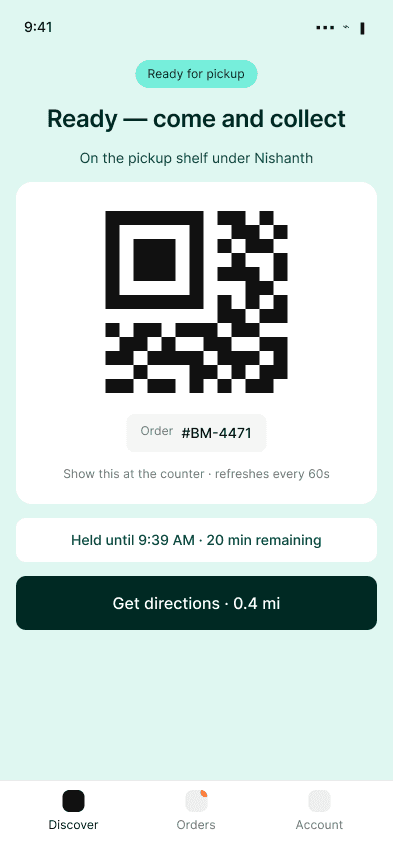
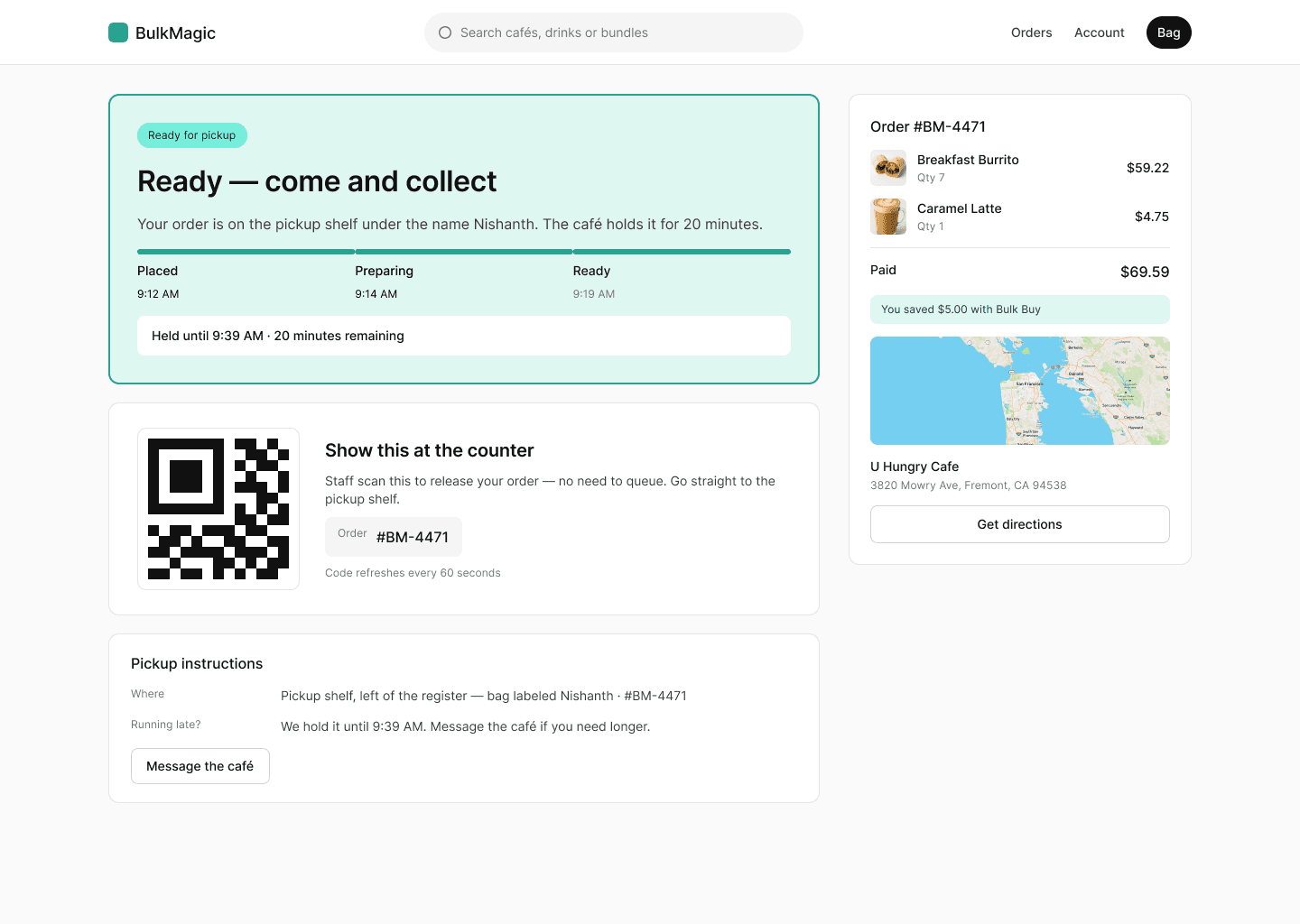
PickupThe QR, order number and hold time are identical. Web adds the timeline, where to find the bag and a map.
The goal wasn't to make both interfaces identical. It was to preserve the same product rules, terminology and feedback across devices while adapting each layout to the tasks and context of its users.
Success criteria
The design work defined connected customer and café workflows, interaction patterns for purchasing and fulfillment, and reusable components across mobile and web. The criteria below were targets set for the MVP, not measured post-launch outcomes — a framework for evaluating adoption, purchasing behavior, checkout reliability and consistency between the customer and café experiences.
BOPIS adoption rate
Would pickup ordering become a habit rather than a one-time trial?Designed for itA no-queue QR pickup, released only when the order is ready (10).
BulkPass conversion
Could the prepay model be understood well enough to be bought?Designed for itThe pass is priced up front and bought from Discover, not a fourth tab (16–18).
Checkout abandonment
Could the flow absorb disruption without losing the order?Designed for itAn unavailable item recalculates in place instead of restarting checkout (07b).
Order status sync failure
Would both views stay true to the same order through fulfillment?Designed for itOne status model shared by the customer's tracker and the café's queue (09 ↔ 12).
The MVP also tracked prep time, QR confirmation rate, redemptions per user and cross-café pass usage. I put the under-7-minute prep target where staff see it — on the handover itself — rather than leaving it for a weekly report.

14 · The prep target, on the handover itself
Reflection
Design the model before the screen.
Hungry Cafe reinforced that complex commerce experiences are built on connected systems, not isolated screens. Location, pricing, inventory and fulfillment may appear as separate interactions, but each affects the same customer promise.
The biggest lesson was to clarify business rules and shared states before committing to interface solutions. That helped me design interactions that communicated changes clearly, preserved customer progress, and supported both sides of the ordering experience.
If I were extending the project, I'd prioritize validating customers' understanding of BulkPass, testing recovery from checkout disruptions, and evaluating how efficiently café staff can manage orders during peak hours.