
Team

5 UX Researchers, 1 Project Manager

Role

UX Researcher

Time Stamp

January 2023 - May 2023

OPTIMIZING MEDICARE ONBOARDING

Project

Project

A Usability Audit for Excellus BlueCross BlueShield


Team

5 UX Researchers

Role

UX Researcher

Time Stamp

January 2023 - May 2023

T

T

ransformed a confusing, high-friction Medicare Welcome Packet into a user-friendly resource through rigorous heuristic evaluation and testing.

ow conducting a usability study on a Medicare Part D Welcome Packet identified key usability issues, resulting in actionable recommendations that enhanced the user experience?

xecutive Summary

xecutive Summary

xecutive Summary

E

E

The Medicare Welcome Packet is the critical first touchpoint for new members. However, existing materials were causing significant confusion for older adults (65+), leading to high support call volumes for Excellus BlueCross BlueShield. Users struggled with dense jargon, complex navigation, and unclear form fields.


My Role & Goal: As a UX Researcher in a team of five, my objective was to diagnose the root causes of these failures and deliver actionable, CMS-compliant design recommendations to improve comprehension and self-service rates.


Our research led to an 86 percent increase in participant confidence with the revised concepts, clearer navigation pathways, and significantly fewer misunderstandings during key tasks. Excellus adopted our core recommendations for their next packet iteration, demonstrating that materials can be fully CMS-compliant while still intuitive for seniors.

The Medicare Welcome Packet is the critical first touchpoint for new members. However, existing materials were causing significant confusion for older adults (65+), leading to high support call volumes for Excellus BlueCross BlueShield. Users struggled with dense jargon, complex navigation, and unclear form fields.


My Role & Goal: As a UX Researcher in a team of five, my objective was to diagnose the root causes of these failures and deliver actionable, CMS-compliant design recommendations to improve comprehension and self-service rates.


Our research led to an 86 percent increase in participant confidence with the revised concepts, clearer navigation pathways, and significantly fewer misunderstandings during key tasks. Excellus adopted our core recommendations for their next packet iteration, demonstrating that materials can be fully CMS-compliant while still intuitive for seniors.

he Constraint

he Constraint

he Constraint

T

T

This was not a blank-slate redesign. All recommendations had to adhere to strict Centers for Medicare & Medicaid Services (CMS) federal guidelines regarding required content and disclosures.


We quickly encountered friction: The client's internal framework prioritized regulatory compliance, while our initial heuristic evaluation prioritized user pain points. A packet could be 100% legally compliant but still 100% confusing to a senior user.

This was not a blank-slate redesign. All recommendations had to adhere to strict Centers for Medicare & Medicaid Services (CMS) federal guidelines regarding required content and disclosures.


We quickly encountered friction: The client's internal framework prioritized regulatory compliance, while our initial heuristic evaluation prioritized user pain points. A packet could be 100% legally compliant but still 100% confusing to a senior user.

CMS Compliance Goals

Strict Legal Requirements

vs

User Experience Goals

Clarity & Comprehension

The Resolution: To resolve this misalignment, we used data. Our pilot testing proved that even fully compliant sections were causing failure. Seeing this evidence, the client agreed to pivot to our usability-first prioritization framework, validating that regulatory boxes shouldn't be checked at the expense of user clarity.

esearch Strategy

esearch Strategy

esearch Strategy

R

R

Piloting & Iteration

Piloting & Iteration

To evaluate the packet comprehensively, we utilized a mixed-method approach. We started with a Heuristic Evaluation to catch surface-level violations against established standards, followed by moderated Usability Testing (N=7) with our target demographic of older adults (65+).

To evaluate the packet comprehensively, we utilized a mixed-method approach. We started with a Heuristic Evaluation to catch surface-level violations against established standards, followed by moderated Usability Testing (N=7) with our target demographic of older adults (65+).

The Pivot: Fixing Flawed Protocols

During pilot testing, we encountered an unexpected hurdle. Participants were failing our tasks not because they couldn't use the packet, but because they couldn't understand our instructions. We had inadvertently used Medicare jargon like "deductible" and "formulary tiers" in the test prompts.

THE ACTION

"Realizing we were testing vocabulary rather than usability, I immediately rewrote the entire test protocol to use plain, scenario-based language."

Original Prompt

"Calculate your out-of-pocket responsibility."

Revised Prompt

"How much would you be paying for your prescription now?"

This pivot allowed participants to focus entirely on interacting with the packet, resulting in cleaner, more reliable data on actual usability flaws.

ore Process

ore Process

ore Process

C

C

From Expert Diagnosis to User Validation

From Expert Diagnosis to User Validation

We used a two-stage approach: first diagnosing issues with expert review, then validating those specific hypotheses with real users.

We used a two-stage approach: first diagnosing issues with expert review, then validating those specific hypotheses with real users.

Phase 1: The Diagnosis (Heuristic Evaluation)

To establish a baseline before user testing, we conducted a rigorous expert audit against Nielsen’s 10 Heuristics, classifying all findings by severity rating to prioritize the most critical issues.


The example below illustrates a foundational violation we identified regarding user navigation and control.
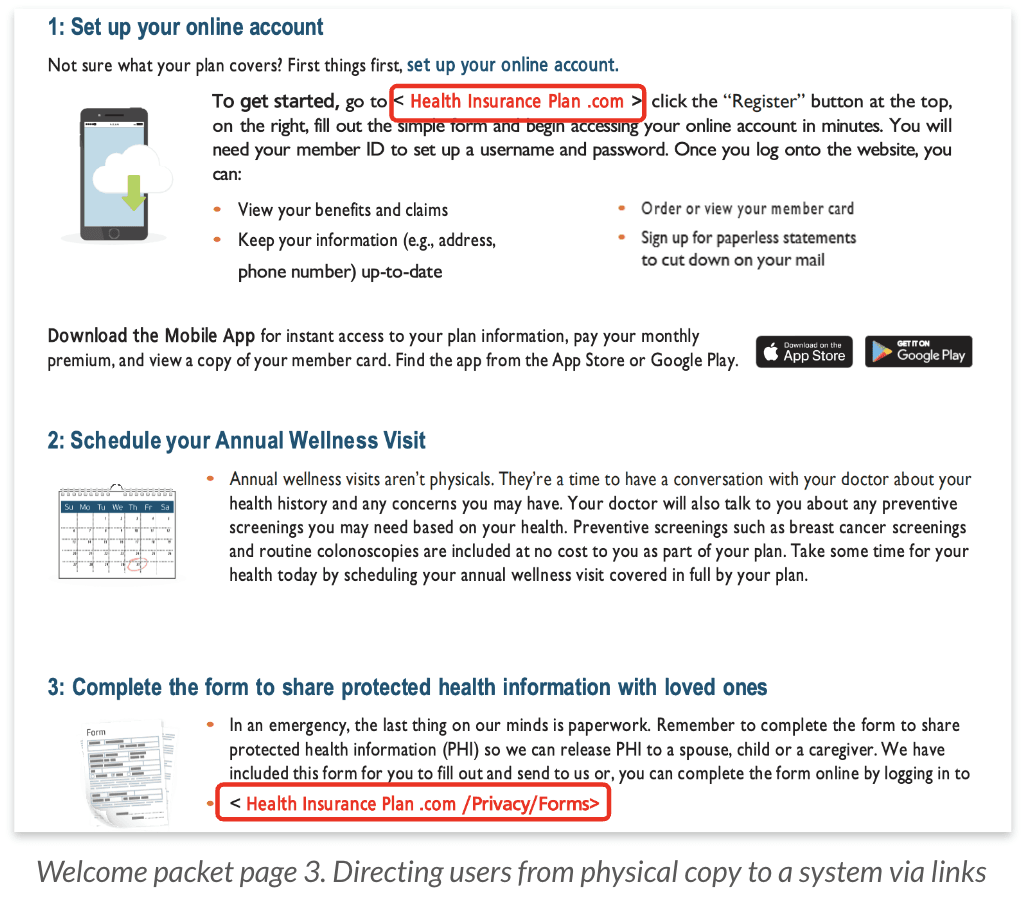
Violation Identified:

Relying on long physical URLs in a printed booklet is difficult for senior users and breaks their journey. This violates the "User Control & Freedom" heuristic.

Severity 3 - Major usability problem

Violation Identified:

Relying on long physical URLs in a printed booklet is difficult for senior users and breaks their journey. This violates the "User Control & Freedom" heuristic.

Severity 3 - Major usability problem

Phase 2: The Connection (Usability Testing)

The Heuristic findings directly shaped our usability test strategy. We designed targeted scenarios to validate the specific critical friction points identified in Phase 1.

The table below illustrates how the high-severity findings were translated into a concrete tasks for user validation.

HEURISTIC EVALUATION

USABILITY TESTING

Diagnosis 1: Poor Visibility of Critical Forms

Essential actions, like submitting the PHI form, had no visual prioritization. For seniors, this created friction, uncertainty, and unnecessary support calls. We predicted this would be one of the highest-friction tasks for seniors and usability testing confirmed it.

“You need to submit your Protected Health Information form so your spouse can discuss your account with Excellus. Please locate the correct form in this packet.”           

“I would enter my ID card number from insurance company”, or “should i put phone number?"            

- One of the participant mentioned

Diagnosis 2: System vs. Real World Language

The "Medicare Phases" section relies heavily on complex jargon (e.g., "coverage gap," "coinsurance") rather than plain language, violating the "Match between system and real world" heuristic.

"Imagine you have already paid $5,000 for prescriptions this year. Look at the 'Phases' page. Based on this, how much would you personally have to pay for your next prescription right now?" 

“I would enter my ID card number from insurance company”, or “should i put phone number?"            

- One of the participant mentioned

ey Findings

ey Findings

ey Findings

K

K

Critical Forms are Buried

7m 02s

Average Time on Task

Users needed to find the "PHI Authorization Form". The form was hidden inside a "Legal" section with no clear signposting. 3 out of 7 participants gave up entirely.

Critical Forms are Buried

Users needed to find the "PHI Authorization Form" (a high-stress task). The form was hidden inside a "Legal" section with no clear signposting.

Time on Task

7m 02s

(Goal: 2m)

3/7 Participants gave up

Jargon Causes "Action Paralysis"

The Failure:

Users stopped reading because they felt intimidated by terms like "Coinsurance" and "Coverage Gap." They assumed they needed a lawyer or agent to understand the cost.

I'm reading this, but I honestly have no idea if I owe money... 'Coinsurance' sounds like we both pay?

— Participant 4

I'm reading this, but I honestly have no idea if I owe money... 'Coinsurance' sounds like we both pay?

— Participant 4

Form Layouts Break Mental Models

The Failure:

The packet split the "Street Address" field across two separate lines (Line 1 on left, Line 2 on right) instead of stacking them. Users wrote their City in the "Address Line 2" slot.

Error rate

4/7

participants failed

trategic Recommendations

trategic Recommendations

S

S

We synthesized our findings into 15 actionable recommendations, organized into three strategic themes for the client.

We synthesized our findings into 15 actionable recommendations, organized into three strategic themes for the client.

Navigation: The "Wayfinding" Fix

Strategy: Reduce cognitive load by externalizing memory. Users shouldn't have to remember where things are; the document should tell them.

The Fix: Implement a "Quick-Find Index" on Page 1 and color-code the three main sections (Benefits, Costs, Legal).

Projected Impact: -60% Search Time

Clarity: The "Plain Language" Fix

Strategy: Demystify the cost. Move from "System-Oriented" terms to "Action-Oriented" terms.

The Fix: Rewrite headers to answer user questions. Change "Coinsurance Responsibility" to "What You Pay". Add a "Jargon Glossary".

Impact: Increased User Confidence

Access: The "Digital Bridge" Fix

Strategy: Meet seniors where they are. Design for both tech-savvy users and those with motor control issues.

The Fix: Create a "Hybrid Access" model. Place large, high-contrast QR codes next to shortened, memorable URLs (e.g., excellus.com/forms).

Impact: Reduced Typing Errors

utcome & Impact

utcome & Impact

utcome & Impact

O

O

Our research directly shaped Excellus’ next iteration of the Medicare Welcome Packet. The client adopted the core recommendations around navigation, plain language, and hybrid digital access, ensuring the packet remained fully CMS-compliant while becoming significantly easier for seniors to use.


In follow-up evaluations, participant confidence in the revised concepts increased by 86 percent, and users were able to locate key actions (like finding the PHI form) with noticeably less effort and hesitation. These changes reduced cognitive load, improved comprehension, and lowered the dependence on customer support for first-time Medicare members.


Beyond the user experience improvements, this project helped Excellus teams recognize that a packet can be 100 percent compliant and still 100 percent confusing without intentional design. Our findings guided cross-team alignment and informed how future CMS-regulated materials should be structured to better support older adults.

Our research directly shaped Excellus’ next iteration of the Medicare Welcome Packet. The client adopted the core recommendations around navigation, plain language, and hybrid digital access, ensuring the packet remained fully CMS-compliant while becoming significantly easier for seniors to use.


In follow-up evaluations, participant confidence in the revised concepts increased by 86 percent, and users were able to locate key actions (like finding the PHI form) with noticeably less effort and hesitation. These changes reduced cognitive load, improved comprehension, and lowered the dependence on customer support for first-time Medicare members.


Beyond the user experience improvements, this project helped Excellus teams recognize that a packet can be 100 percent compliant and still 100 percent confusing without intentional design. Our findings guided cross-team alignment and informed how future CMS-regulated materials should be structured to better support older adults.

etrospective

etrospective

R

R

Recruiting is an Empathy Exercise

Recruiting older adults required moving beyond standard panels. We succeeded by using community networks and reframing the session from a "test" to a "conversation," which significantly lowered participant anxiety.hings are; the document should tell them.

The Art of Moderation

Working with a vulnerable demographic taught me to slow my pace, simplify my language, and become highly attuned to non-verbal cues of hesitation.

Management

This project reinforced that accessible research isn't just about the product; it's also about managing the balance between strict compliance and human needs.


ther Projects

ther Projects

O

O